

Android TV Stick 14.0, 2025 4K TV Stick 2GB RAM 16GB ROM Ultra HD RK3518 CPU Supports 2.4G/5G Wi-Fi Bluetooth 5.0 USB HDR10 with Bluetooth Voice Remote Control – Black
$32.99
Related Products


Product description


【Plug and Play & Easy Setup】Simply plug the android tv stick into your TV’s HDMI port, connect to Wi-Fi, and you’re ready to go! Our intuitive interface and step-by-step guide get you from tv stick to binge-watching in less than 5 minutes. Enjoy a seamless setup experience and instantly unlock a world of entertainment.
【HD and 4K】Transform your TV into a powerful entertainment hub. Experience your favorite shows, movies, and games in breathtaking clarity with vibrant colors and sharp details. Stream content in up to 4K Ultra HD resolution for a truly cinematic experience right in your living room.
【Powerful Performance】Powered by a powerful processor and dual-band Wi-Fi 2.4&5G, the tv stick ensures fast, fluid streaming without annoying buffering or lag. Enjoy a smooth and responsive navigation experience, even when switching between multiple apps at high definition.
【Massive Content Library & Voice Control】Access millions of movies, TV episodes, live sports, and music from all your favorite apps like Netflix, YouTube, Prime Video, and more. The included voice remote lets you easily search for content, control playback, and even manage smart tv with simple voice commands.
【Compact & Portable Design】Its small and lightweight design makes it the perfect travel companion. Take your personalized entertainment with you anywhere-just plug it into any hotel or vacation rental TV’s HDMI port.
5 reviews for Android TV Stick 14.0, 2025 4K TV Stick 2GB RAM 16GB ROM Ultra HD RK3518 CPU Supports 2.4G/5G Wi-Fi Bluetooth 5.0 USB HDR10 with Bluetooth Voice Remote Control – Black
Add a review

$32.99
Hoeffy –
No Bluetooth
No Bluetooth connection, hard time to search titles
Rjaspe –
Very faulty connection with the remote control
Very good idea but very faulty remote control. It keeps asking to pair the remote control with the android TV stick. At least six times in less than half an hour It’s going back to Amazon, don’t recommend it.
Daniel Donoso –
Una buena opción
Great deal
B.ill –
AndroidTV was a disappointing experience
We’ve tested this Android Stick for a couple of days and it fell way short. We wanted to give AndroidTV a chance, but the device felt unrefined compared to our previous experience with FireTV. It was slow to launch apps, difficult to configure, the remote fails to power off our TV and troubleshooting it just isn’t worth the effort.We also faced constant WiFi connection drops, even on a high-end WiFi 6 Eero Pro 6e mesh system only 10 feet away. We are returning this and going back to the proven FireTV platform. We’ve ordered the 4K Max; we won’t use the 4K resolution yet, but the upgrade to 16GB of storage and Dolby Atmos sound will be a welcome improvement.”
riverraisin –
Android TV Stick vs Roku
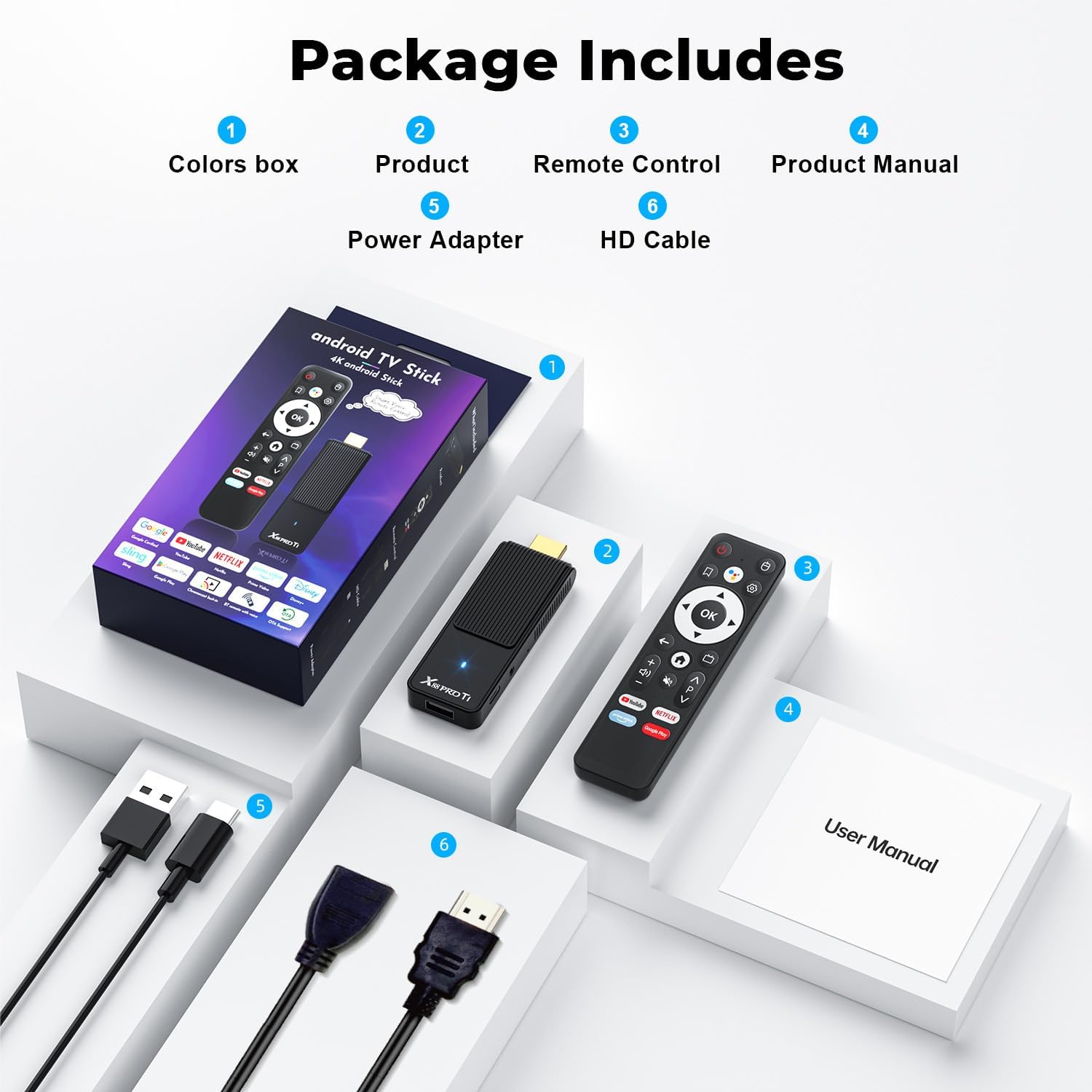
I’ve owned numerous Roku devices since the early days, so I have good knowledge of use for those units, but this is the first time trying something different.This Android TV Stick 14.0 by GREALT comes with the remote, Android stick, USB-A to USB-C power cable, HDMI extension cable (for if you need it), and a user manual.The miniature user manual, although feeling like it’s thick, only has 6 pages of information in each of several different languages. So you get very basic information that isn’t very helpful if you aren’t a seasoned user of these units.Pretty much every control on the remote is a symbol that if you aren’t familiar with, you have to guess what they are for, because the user manual has zero information about the remote. Comparing this remote to several Roku remotes I have makes it quite obvious that this one is smaller and way cheaply made compared to Roku. It does not come with batteries, which is a minor inconvenience.The streaming stick is small enough to fit in the palm of your hand and is very light. It has an HDMI plug on one end that plugged directly into the back of my TV with no issues, but it also comes with an 8” HDMI extension cable if you have access issues. The stick also has the USB-C connection for power. If you’re TV has a USB-A connection you can plug it directly into the back of your TV and use the TV power to run this stick. This eliminates having to physically unplug the stick from power when not in use. There is also a USB-A port on the back of the stick which I assume is for plugging in a flash drive, but may be another choice for power. I don’t know, because, well, the user manual’s lack of content. Lastly, there is also a small hole in the side that looks like a plug for earbuds but is too small for standard 3.5mm plugs. It’ll remain a mystery what that’s for.Actually, connecting and getting started was surprisingly seamless for me. Just the usual WIFI password to connect to the internet. I was ready to go in just a few minutes. Downloading apps, however, was not a good experience. To download any apps I had to sign in to Google Play Store. I don’t ever remember having to sign in to the app store in the past to use it, but OK. The first thing I wanted to do was download the Roku app, which I’ve done on my Samsung smart TV before. It’s not even available for this Android stick. So I tried a few news apps and Pluto TV. I had some issues with some of the apps not working, but for the most part they loaded OK. One big issue is that it takes about 10 seconds for any program to buffer. The picture will be very blurry during that time. When I re-installed my Roku box after this test was over there was no buffering. Clean picture right away on Roku.In summary, This Android TV Stick by GREALT is a decent unit, but I will take a Roku device any day of the week and pay more money for what I feel is much, much easier for downloading apps (no need for Google Play Store) and a lot more user friendly experience. Plus they’ve been a dependable, worry free device for years with me.It’s Roku for the win