

Weavixol Drone With Camera For Beginner 1080p, Brushless Drones With Screen On Controller, No FAA, Under 249g, Beginner Drone With Altitude Hold, One Key Take Off/Land, 360 Flips,Trajectory Flight, 2 Batteries
$49.99
Related Products




Product description
Foldable Drone With Screen On Controller 
Beginner Drones With Camera For Adults 


1 Built in Screen
2 Brushless Drone
3 HD Camera
4 <249g


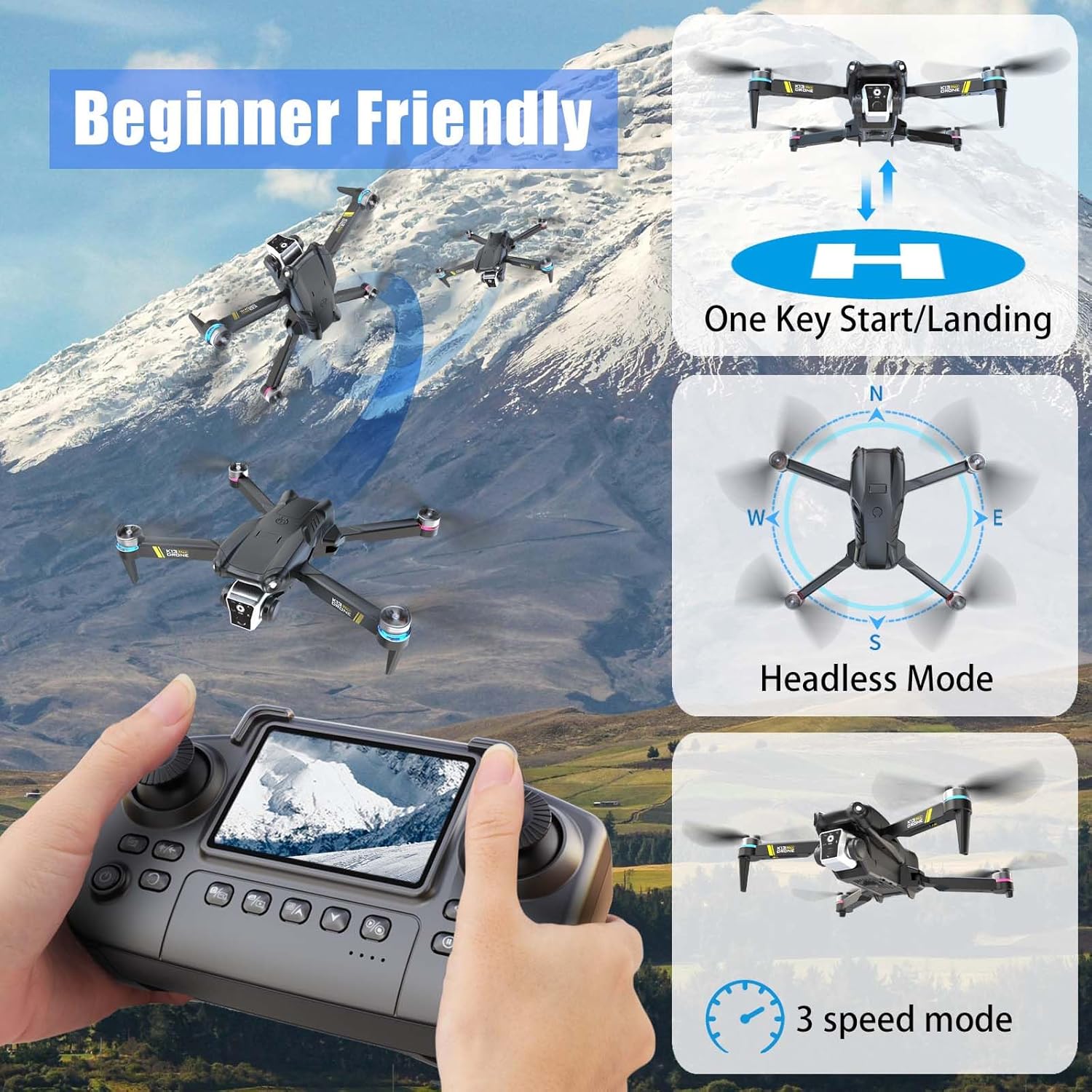
1 Beginner Friendly
2 Optical Flow Positioning
3 360° flip
4 Gesture Selfie
Drones With Interesting Functions For Beginner
The small drone reduces the difficulty of getting started, allowing you to quickly master even on your first flight and experience the joy of piloting a drone
The video showcases the product in use.The video guides you through product setup.The video compares multiple products.The video shows the product being unpacked. drone with built-in screen Merchant Video
 RC Drone With Camera For Beginner
Package Contents
1 x Drone 1 x Remote Control With Screen 1 x Traveling Bag
2 x Drone Rechargeable Battery(Use only standard 5V/1A chargers,Incompatible with Fast Chargers)
1 x SD Card 1 x SD Card Reader
1 x Instruction Manual 1 x USB Charging Cable(Make sure to use this charging cable to charge the battery)
4 x Main Blades 1 x Screwdriver
【Brushless Drone for Beginners】:The Weavxiol K13MAX is a fantastic beginner drone featuring a controller with a built-in display for more convenient flying. It’s equipped with brushless motors for increased power and greater durability. Beginner-friendly functions like one-touch takeoff/landing, headless mode, 360° flips, and altitude hold let you quickly master the essentials of flight.
【1080p Camera Drone】:This mini drone features a 1080p camera with a 110° wide-angle lens for an expansive field of view. Effortlessly capture impressive aerial footage and instantly share those special moments with loved ones. While it doesn’t offer electronic adjustment, the lens can be manually tilted 90 degrees.
【Ultra-lightweight, No FAA,longer battery life】:This drone is an excellent choice because it weighs below 250 grams and requires no FAA registration or Remote ID. Enjoy extended airtime with two included rechargeable batteries, providing up to 30 minutes of flight duration.
【Important Charging Info Before You Buy】:Avoid third-party cables (like your phone cable), as their varying specs can prevent charging. Our battery requires 5V/1A input, use ONLY the provided charging cable. If the remote emits a constant beeping sound, this isn’t a malfunction – it’s a low battery warning. Since the drone is battery-powered, low charge will cause expected issues like lost signal and reduced motor power. Always check battery level first if anything seems wrong.
【Level Calibrate and Trim Adjustment for Drift Correction】:Always perform level calibration before takeoff — this is critical for stable flight. If the drone has been moved since its last flight, its horizontal reference may shift. Calibration ensures accurate attitude data for the current flight. To calibrate: place the drone on a level surface, push both controller sticks down and outward (left joystick ↙ bottom-left, right joystick ↘ bottom-right) and hold for 2 seconds. This is an essential step every pilot should make routine – please don’t skip it.If the drone begins to drift, use the TRIM button on the remote controller to adjust.
【How to connect a mobile phone】:The drone’s WiFi can only connect to one device at a time. For example, if the remote controller is connected, your phone won’t be able to connect. If you want to connect your phone to the drone, here’s how to do it right: First, make sure the controller is completely powered off. Then start up the drone itself and connect your phone to its WiFi network. Once you’re connected, open the drone app on your phone – that’ll get the live video feed working. Only after you’ve got the video stream should you finally power up the remote controller to establish the control link.
【First flight tips】:Due to drone operational complexity, thoroughly review the user manual before takeoff, and choose a windless open area, keep the altitude below 30 ft and the distance below 100 ft to help better practice and control the drone.Just so you know, the K13 is designed as a beginner drone, so it doesn’t come with GPS or auto-return features. That means you’ll need to keep a close eye on your signal bars and avoid pushing its range limits(328 ft).
8 reviews for Weavixol Drone With Camera For Beginner 1080p, Brushless Drones With Screen On Controller, No FAA, Under 249g, Beginner Drone With Altitude Hold, One Key Take Off/Land, 360 Flips,Trajectory Flight, 2 Batteries
Add a review

$49.99
Doreen –
Sturdy high quality Drone bought for 12″year old granddaughter. Great for a gift worth the money!
Bought for Granddaughter age 12. Very nice, sturdy ,flies well , does flips and lights up, easy to use remote! Would highly recommend great price and warranty bought as well!
Cody Wendt –
I wouldn’t buy it my poor son was disappointed
Ordered it for my son for Christmas. We took it outside turned on the remote turned on the drone and it took off never seen it again waste of money for us.
Brittany Gargiulo –
Screen on controller makes it simple
I don’t really have much experience with drones, so most of the flying is done by my husband with our child, but I’ve tried it a couple of times and it didn’t feel intimidating. The controller has a built in screen which saves the step of connecting a phone, and it makes it easier for me to just turn it on and see what the camera is looking at. The picture quality is clear enough that we can spot the kids’ playground from higher up, and the foldable arms make it quick to pack away in its case after they are done. Having two batteries has been useful because one runs down faster if they practice flips, but swapping in the second keeps the fun going without much wait. The one touch takeoff and landing gives me confidence when I try it myself, and it feels like a good beginner option for a family setting.
Thomas –
Fly at your own risk
Broke after one day
Issie –
This drone is a solid choice for beginners.
This drone is a solid choice for beginners. It’s lightweight (under 250g), so no FAA registration is needed, and the brushless motors give it smoother, more stable flight than cheap toy drones. The built-in screen on the controller is handy since you don’t have to rely on a phone for flying. The 1080p camera captures decent footage, and the manual tilt adds some flexibility. Controls are simple with one-key takeoff/landing, flips, and altitude hold. With two batteries, you get about 30 minutes of practice time per session.
WREN –
Cool Starter Drone For Backyard Practice
I’ve been taking it out into the backyard on calm days and just playing around with different maneuvers. It lifts off smoothly and doesn’t feel twitchy like some other beginner models I’ve seen. I liked that I could control everything from the remote without relying on my phone. The one-button takeoff is handy, and once it’s in the air, it stays fairly level. I had to do the trim adjustment once, but after that, the flight stayed smooth.
ALLEN –
Fun Drone That’s Easy To Carry Around
This drone has been more enjoyable than I expected, especially for something that doesn’t need any paperwork to fly. The size and weight make it easy to bring along anywhere. I tossed it in my backpack and took it to the park, and it became the center of attention once I launched it. The controls felt smooth and the motors are stronger than I assumed they’d be. It responded well to input and stayed up even with some wind gusts. I liked that it doesn’t rely on using a phone screen—having the controller screen is way more convenient.
Sophia C –
Surprisingly Stable For The Size
I kept it under tree height during most of the flights and only had one moment where the wind nudged it off track. It’s easy to bring back on course with a light touch. The camera gives a cool perspective and is decent enough for watching playback or snapping clips to send to friends. I used the line-drawing flight path feature once and it actually followed it pretty closely. As long as you’re somewhere with open sky and low interference, it performs well.